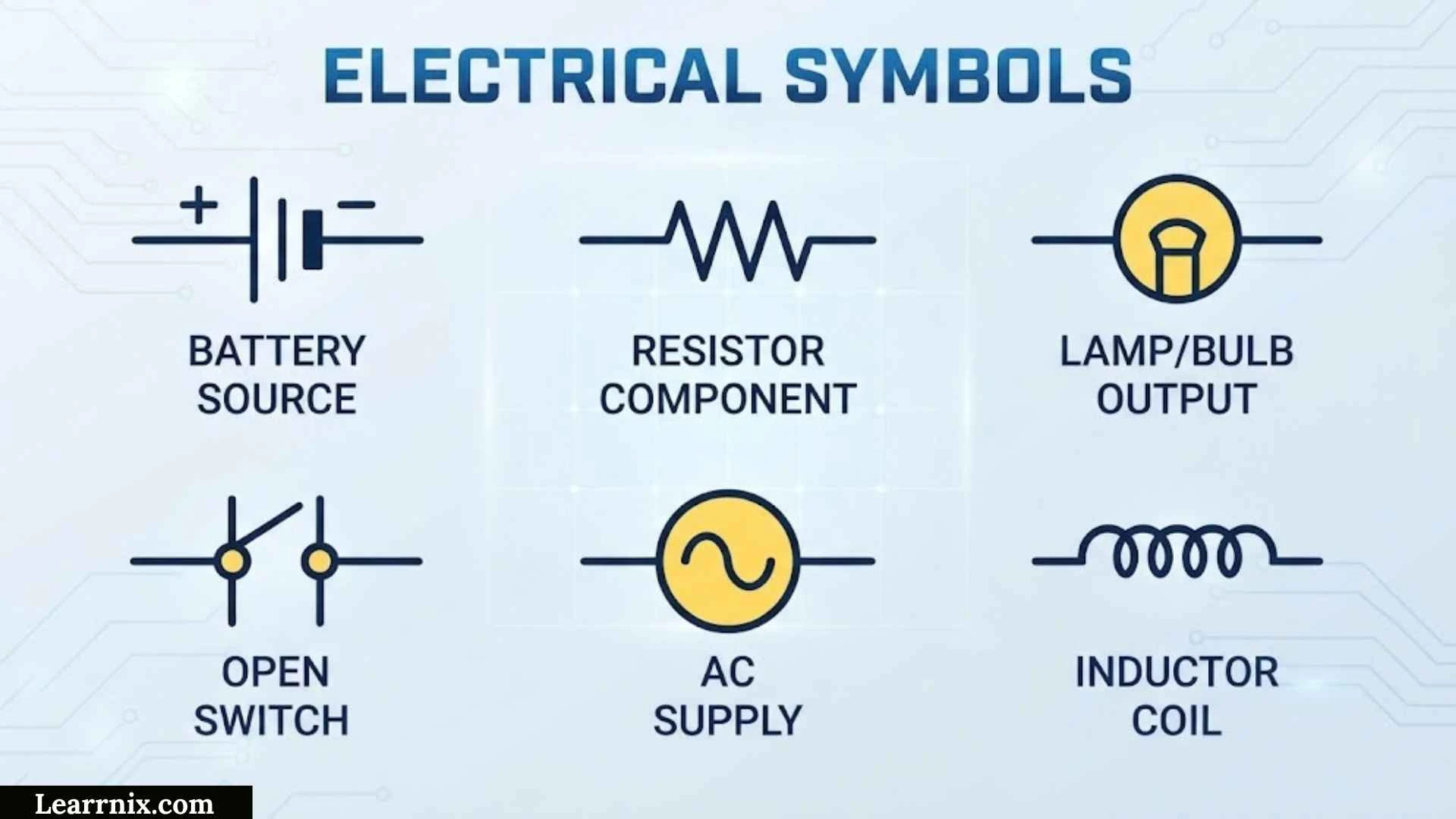
Electrical symbols are the visual language used to represent components, connections, devices, and functions in electrical drawings. Instead of writing long descriptions for every part of a circuit, engineers, electricians, designers, and technicians use standardized symbols to communicate information quickly and clearly.
From basic switches and resistors to circuit breakers, motors, transformers, HVAC controls, automotive components, and residential wiring devices, electrical symbols appear in many different types of diagrams. The exact appearance can depend on the drawing standard, industry, software, and project requirements. IEC 60617, for example, provides a large international database of graphical symbols for electrotechnical diagrams.
This guide explains electrical symbols with names and meanings, provides useful chart-style references, and covers symbols found on blueprints and specialized drawings. It also explains how electrical symbols are used in AutoCAD, Visio, and Bluebeam, helping beginners and experienced users understand where each type of symbol fits.
Electrical Symbols For Drawings
Electrical symbols for drawings are graphical representations of electrical components and functions. They allow a schematic or electrical plan to communicate information without filling the page with written descriptions.
Some frequently encountered components include:
| Symbol/Representation | Name | Main Purpose |
| ⏚ | Ground/Earth | Indicates a grounding or earthing connection |
| Ω | Ohm | Represents the unit of electrical resistance |
| R | Resistor | Limits or controls current |
| C | Capacitor | Stores electrical charge |
| L | Inductor | Represents inductance |
| D | Diode | Controls current flow direction |
| M | Motor | Represents an electric motor |
| T | Transformer | Transfers electrical energy between circuits |
| F | Fuse | Provides overcurrent protection |
| S | Switch | Opens or closes a circuit |
| CB | Circuit Breaker | Provides protective circuit interruption |
| LED | Light-Emitting Diode | Produces light when electrically energized |
The symbols used in a detailed schematic can be different from those used on an architectural electrical plan. A schematic usually focuses on how components are electrically connected, while a construction drawing often focuses on where devices will be installed.
The drawing legend is therefore extremely important. If a symbol looks unfamiliar, check the legend before assuming what it represents.
Electrical Symbols With Names
Learning the name of a symbol is one of the easiest ways to become comfortable with electrical diagrams. A symbol represents a component or function, while nearby letters, numbers, and labels provide additional information.
Here are some important electrical symbols and their common names:
- R — Resistor: A component used to provide resistance in a circuit.
- C — Capacitor: A component that stores electrical energy in an electric field.
- L — Inductor: A component associated with inductance and magnetic energy storage.
- D — Diode: A semiconductor device that primarily permits current in one direction.
- LED — Light-emitting diode: A semiconductor device that emits light when appropriately energized.
- M — Motor: Converts electrical energy into mechanical motion.
- T — Transformer: Transfers AC energy between windings and can change voltage levels.
- F — Fuse: Opens a circuit when excessive current causes the fuse element to operate.
- S — Switch: Controls whether an electrical path is open or closed.
- CB — Circuit breaker: A protective switching device designed to interrupt certain abnormal current conditions.
- ⏚ — Ground/Earth: Identifies a grounding or earthing connection.
- Battery symbol: Represents a source of DC electrical energy.
- Lamp symbol: Represents a lighting device or visual indicator.
- Relay symbol: Represents an electrically operated switching device.
It is useful to distinguish between a graphical symbol and a reference designation. For example, R1, C2, or M1 may identify individual components in a particular drawing. The letters and numbering system can vary according to the standard or project.
Electrical Symbols And Meanings
The meaning of an electrical symbol depends on its graphical form, surrounding labels, and the type of drawing in which it appears. A symbol should not always be interpreted in isolation.
For example, a switch symbol generally represents a device that controls an electrical path. A resistor represents resistance, while a fuse represents a protective device. A motor symbol identifies a device that converts electrical energy into mechanical motion.
Some important meanings include:
- Resistor: Controls current or creates a desired voltage relationship.
- Capacitor: Stores electrical charge and can be used for filtering, timing, coupling, and other functions.
- Inductor: Represents inductive behavior and is used in filtering, energy storage, and control circuits.
- Diode: Provides directional current behavior.
- Fuse: Protects a circuit by interrupting current when its operating condition is exceeded.
- Circuit breaker: Provides switching and protection and can generally be reset after an interruption.
- Transformer: Transfers electrical energy between circuits through magnetic coupling.
- Ground: Identifies an electrical ground or earth connection according to the circuit design.
- Switch: Controls an electrical circuit.
- Lamp: Represents a lighting load or indicator.
- Motor: Represents an electromechanical load.
- Relay: Uses an electrical control signal to operate contacts.
- Battery: Provides a DC electrical source.
Some symbols have variations that communicate additional information. A normally open contact, for instance, is different from a normally closed contact. A switch may also have one pole, multiple poles, or several positions.
This is why reading the complete drawing is more reliable than memorizing isolated shapes.
Electrical Symbols Chart
An electrical symbols chart is useful when reading a schematic, wiring diagram, control drawing, or electrical plan. The chart below provides a compact reference for commonly encountered components.
| Electrical Component | Common Designation | What It Represents |
| Resistor | R | Electrical resistance |
| Variable Resistor | VR | Adjustable resistance |
| Capacitor | C | Electrical capacitance |
| Inductor | L | Inductance |
| Diode | D | One-direction semiconductor behavior |
| LED | LED | Light-emitting diode |
| Battery | BT/B | DC source |
| AC Source | AC | Alternating-current source |
| Transformer | T | Voltage/energy transfer between windings |
| Motor | M | Electrical motor |
| Generator | G | Electrical generator |
| Fuse | F | Overcurrent protection |
| Circuit Breaker | CB | Protective switching |
| Switch | S | Manual or automatic circuit control |
| Relay | K/Relay | Electrically operated switching |
| Contactor | K/Contactor | Power switching device |
| Ground | GND/⏚ | Ground or earth connection |
| Lamp | L/Lamp | Light or indicator |
| Terminal | X/TB | Connection point |
Reference designations are not universal across every drawing standard. For example, North American and IEC-based control drawings can use different letter conventions for some devices. Always follow the project’s legend and documentation standard when interpreting tags.
IEC 60617 is particularly broad, covering conductors, passive components, semiconductor devices, switchgear, protection, measuring equipment, signaling, telecommunications, and installation diagrams.
Basic Electrical Symbols
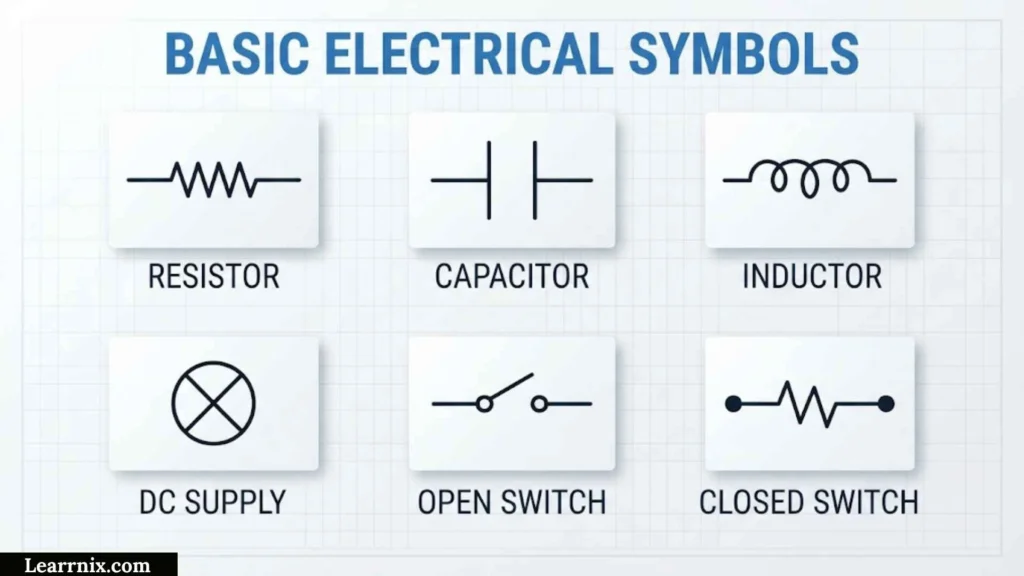
Basic electrical symbols are the foundation for understanding more complicated schematics. Most beginner circuits can be understood by learning a relatively small group of components.
Basic Power Symbols
A battery or DC source represents electrical energy entering a circuit. An AC source represents an alternating-current supply. Ground symbols identify an electrical reference or grounding connection.
Basic Control Symbols
Switches, push buttons, and selector switches are used to control electrical circuits. A normally open contact remains open in its normal state, while a normally closed contact remains closed in its normal state.
Basic Circuit Components
Resistors, capacitors, inductors, and diodes are among the most important components to recognize. They frequently appear in electronic circuits as well as control and power diagrams.
A simple circuit might contain:
Source → Switch → Load → Return
For example, a battery may supply power, a switch controls the circuit, and a lamp consumes electrical energy. Once this basic relationship is understood, larger schematics become easier to trace.
Common Electrical Symbols
Common electrical symbols appear in industrial controls, building plans, machinery diagrams, electronics, and wiring documentation. Some of the most useful categories are power, protection, control, loads, and electronic components.
Power And Protection Symbols
Common examples include batteries, AC sources, transformers, fuses, circuit breakers, disconnects, and ground connections.
Control Symbols
Control drawings frequently include switches, push buttons, selector switches, relays, contactors, limit switches, and sensors. These symbols explain how equipment is started, stopped, monitored, or controlled.
Load Symbols
Motors, lamps, heaters, solenoids, and other loads show where electrical energy is being converted into another form.
Modern CAD libraries can contain hundreds or thousands of specialized symbols. Autodesk’s AutoCAD Electrical documentation, for example, includes categories for push buttons, circuit breakers, fuses, transformers, relays, motors, sensors, terminals, receptacles, and many other devices.
HVAC Electrical Symbols
HVAC electrical symbols are used to document the electrical and control portions of heating, ventilation, and air-conditioning systems.
Typical HVAC drawings may contain symbols or labels for:
- Thermostats
- Fan motors
- Compressors
- Contactors
- Relays
- Transformers
- Disconnects
- Pressure switches
- Temperature switches
- Limit switches
- Sensors
- Solenoid valves
- Dampers and actuators
A thermostat, for example, may provide a control signal based on temperature. A contactor can control a higher-power HVAC load, while a transformer may supply a lower control voltage.
HVAC diagrams often combine electrical information with mechanical equipment information. This makes the drawing legend especially important because the same project may contain architectural, mechanical, electrical, and controls symbols.
When troubleshooting HVAC equipment, technicians commonly follow the circuit from the power source through protective devices and controls toward the load. Recognizing the symbols makes that process much faster.
Automotive Electrical Symbols
Automotive electrical symbols are used in vehicle wiring diagrams to represent batteries, motors, switches, lamps, sensors, relays, fuses, control modules, and other electrical equipment.
Common automotive components include:
- Battery: Supplies electrical power.
- Alternator: Generates electrical power while the engine is operating.
- Starter motor: Cranks the engine during starting.
- Fuse: Protects an electrical circuit from excessive current.
- Relay: Allows a control circuit to operate another circuit.
- Ground: Shows the return or grounding connection.
- Lamp: Represents headlights, brake lights, indicators, or other lighting.
- Motor: Can represent window, blower, fan, wiper, or other motors.
- Sensor: Detects a physical condition and sends information to a control system.
- Switch: Controls an electrical function.
Automotive diagrams may also include connector numbers, wire colors, terminal numbers, circuit IDs, and module names. These details are often essential when diagnosing a fault.
A symbol by itself may tell you what type of component is present, but the wire path and associated labels explain how that component participates in the vehicle’s electrical system.
Electrical Symbols On Blueprints
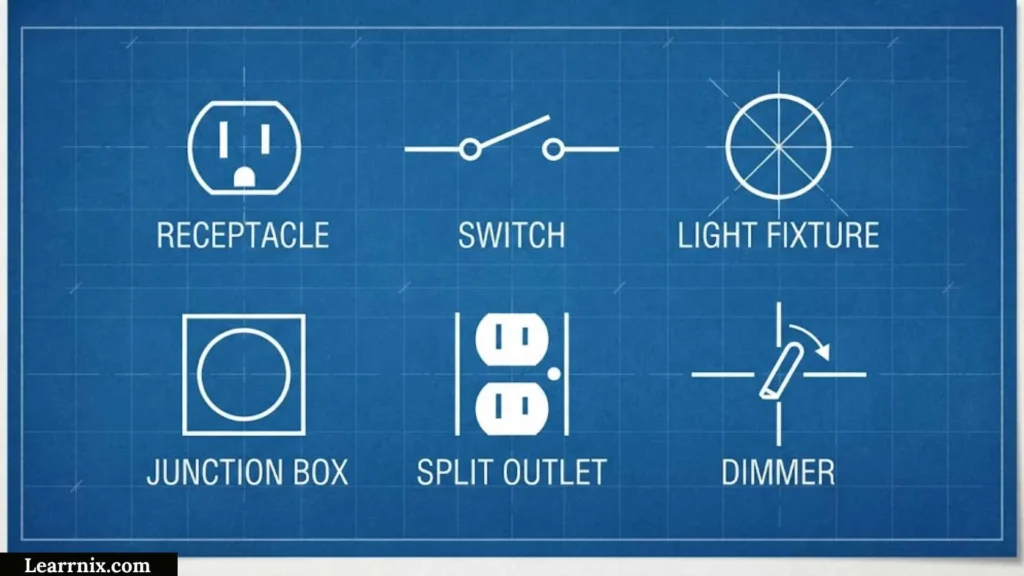
Electrical symbols on blueprints show the location and type of electrical devices within a building or structure. They are common on residential, commercial, and industrial construction plans.
A residential electrical blueprint might show:
- Wall outlets
- Lighting fixtures
- Switches
- Ceiling fans
- Smoke alarms
- Electrical panels
- Dedicated appliance outlets
- HVAC connections
- Data and communication points
- Disconnects
Blueprint symbols are generally designed to be quickly understood by electricians, builders, inspectors, architects, and other project participants.
One important difference is that a blueprint may focus on where a device is located, while a schematic focuses more heavily on how components are electrically connected.
For example, an outlet symbol positioned beside a wall may communicate its intended installation location. A detailed circuit schematic, in contrast, may show the electrical path through a switch, protective device, and load.
Never assume that a symbol has the same meaning on every blueprint. Check the project’s symbol legend first.
Autocad Electrical Symbols
AutoCAD electrical symbols are used to create professional electrical drawings and schematics. Depending on the workflow, symbols may be inserted as blocks or selected from specialized electrical libraries.
A useful symbol library can contain:
- Resistors
- Capacitors
- Switches
- Push buttons
- Relays
- Contactors
- Circuit breakers
- Fuses
- Transformers
- Motors
- Generators
- Sensors
- Terminals
- Connectors
AutoCAD Electrical includes dedicated libraries and symbol categories, including IEC-based symbol collections. Autodesk documentation shows separate symbol groups for circuit breakers, disconnects, fuses, transformers, relays, motors, lights, PLC I/O, terminals, switches, sensors, and other electrical devices.
When creating a CAD symbol library, consistency matters. Symbols should use appropriate insertion points, layers, units, scaling, attributes, and naming conventions.
This is especially important when a drawing contains hundreds of devices. A well-organized library reduces repetitive work and makes revisions easier.
How To Use Viseo To Add Electrical Symbols
If you mean Microsoft Visio, electrical symbols can be added through electrical and engineering templates and shape stencils.
A simple workflow is:
- Open Microsoft Visio.
- Select an electrical, engineering, or suitable diagram template.
- Open the relevant shape stencil.
- Find the required electrical component.
- Drag the symbol onto the drawing page.
- Connect symbols with connector lines.
- Add labels or component information.
- Align the components so the diagram is easy to read.
- Review the connections before sharing or exporting the drawing.
Visio is useful when the main goal is to create a clear diagram without manually drawing every graphical component.
For example, you could create a basic control diagram with a power source, switch, relay, and motor. Each component can be placed as a separate shape, while connectors show the relationship between them.
One useful practice is to keep the diagram visually consistent. Use similar sizes for related symbols, maintain clear spacing, avoid unnecessary crossing lines, and label components where the reader needs additional information.
Electrical Symbols Autocad
Electrical symbols in AutoCAD can be managed as reusable blocks or through dedicated electrical symbol libraries. This makes it possible to place the same component repeatedly without redrawing it.
For example, if a residential plan contains 30 receptacles, creating or selecting one properly designed symbol and reusing it is more efficient than drawing each outlet manually.
A good AutoCAD symbol should have:
- A consistent scale
- Correct insertion point
- Appropriate layers
- Clear geometry
- Useful attributes
- Consistent naming
- Proper connection points
Some electrical CAD libraries also attach information such as component tags, ratings, descriptions, manufacturer information, and part numbers to blocks. This can make drawings more useful for documentation and parts management.
When using a downloaded symbol library, verify that the symbols match your required drafting standard. A symbol that resembles an IEC symbol is not automatically proof of formal compliance with every clause of a standard.
Bluebeam Electrical Symbols
Bluebeam is commonly used for working with PDF drawings and construction documents. Electrical professionals can use reusable markup tools to place symbols and annotations over electrical plans.
For example, a Bluebeam symbol tool set can contain frequently used:
- Outlets
- Light fixtures
- Switches
- Fire alarm devices
- HVAC devices
- Data points
- Electrical equipment
- Revision markers
A typical workflow involves opening the electrical PDF, selecting a markup tool, placing the symbol, adjusting its size and position, and adding notes when necessary.
Reusable tools are particularly useful when reviewing multiple drawings that contain similar devices. Instead of creating the same markup from scratch, a saved symbol can be reused.
Bluebeam is different from AutoCAD because it is primarily a PDF markup and document-review environment. AutoCAD is generally used to create and edit CAD drawings, while Bluebeam is especially useful for reviewing, annotating, coordinating, and communicating changes on PDF documents.
Residential Electrical Symbols
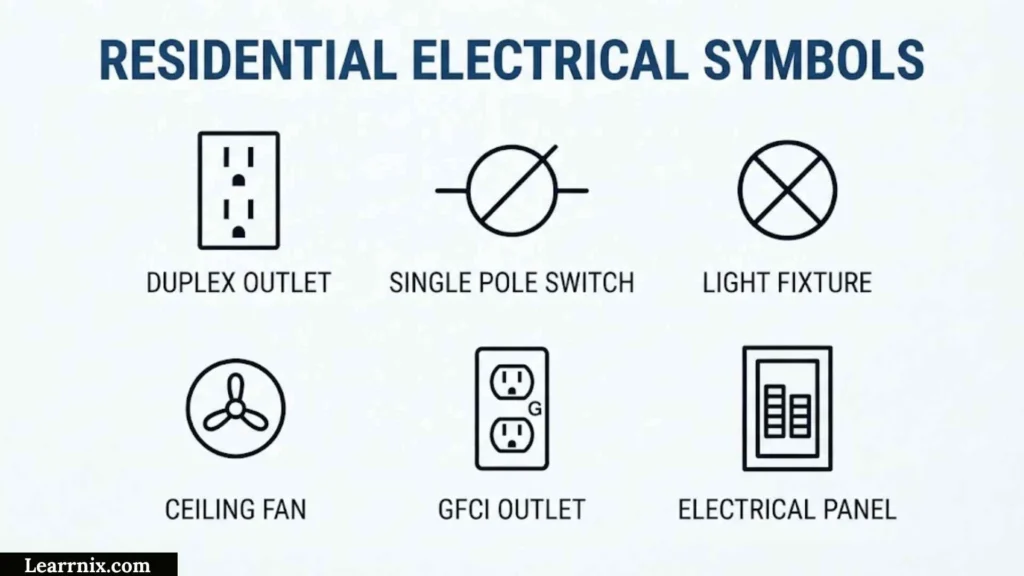
Residential electrical symbols are used on house plans to show where electrical devices and connections are planned.
Common residential symbols include:
- Light fixture: Shows a lighting location.
- Wall switch: Shows a control point for lighting or another device.
- Receptacle: Indicates a general-purpose electrical outlet.
- GFCI receptacle: Identifies a receptacle associated with ground-fault protection requirements.
- Dedicated outlet: Indicates an outlet intended for a specific appliance or equipment load.
- Electrical panel: Shows the location of the home’s distribution panel.
- Smoke alarm: Indicates an alarm location.
- Ceiling fan: Shows the planned location of a fan and its associated control.
- Doorbell: Identifies a doorbell device or connection.
- HVAC connection: Indicates electrical service or connection associated with HVAC equipment.
A residential plan may also use abbreviations beside symbols. For example, a symbol may identify a device while a nearby note specifies its mounting height, circuit, or other installation information.
Residential Symbol Reading Tips
Start by locating the legend. Then identify the electrical panel and major circuits before examining individual outlets and switches.
Pay attention to lines connecting devices, because they may indicate circuit relationships or control arrangements. A switch located near a light does not necessarily mean it is connected only to that light; the actual drawing convention and circuit information should be checked.
For installation work, the blueprint is not a replacement for applicable electrical codes, manufacturer instructions, or professional requirements. Symbols communicate design intent, while installation must follow the requirements applicable to the project.
Frequently Asked Questions
What are the most common electrical symbols?
The most common electrical symbols represent switches, outlets, lights, resistors, capacitors, diodes, motors, transformers, fuses, circuit breakers, batteries, relays, and ground connections.
What does an electrical symbol tell you?
An electrical symbol usually identifies a component, device, connection, or function. Additional labels, reference numbers, ratings, and the drawing legend provide information that the graphical symbol alone may not communicate.
Are electrical symbols standardized?
Many electrical symbols are based on recognized standards, including IEC 60617 and North American conventions such as ANSI/IEEE practices. However, drawings can use different conventions, so the project legend should always be checked.
What is the difference between AutoCAD and Bluebeam for electrical drawings?
AutoCAD is primarily used to create and edit CAD drawings, while Bluebeam is commonly used to review, annotate, and coordinate PDF documents. Electrical professionals may use both at different stages of a project.
Can I copy electrical symbols into my own drawings?
Yes, symbols can often be reused through CAD blocks, software libraries, or saved markup tools. However, make sure the symbol library is appropriate for the drawing standard and project requirements before using it in professional documentation.
Conclusion
Electrical symbols make complex electrical information easier to communicate. By learning common components such as switches, resistors, capacitors, fuses, circuit breakers, motors, transformers, relays, and grounding connections, you can become much more comfortable reading schematics and electrical plans.
Different industries use symbols in slightly different ways. HVAC drawings emphasize equipment and control devices, automotive diagrams focus on vehicle circuits and modules, while residential blueprints emphasize device locations. CAD and PDF tools such as AutoCAD, Visio, and Bluebeam also provide different ways to create, reuse, and review electrical symbols.
The best habit is to combine symbol knowledge with the drawing legend and applicable standard. Do not rely on the appearance of a symbol alone when accuracy matters. With regular practice, electrical symbols become a quick and practical visual language for understanding everything from a simple circuit to a large professional electrical drawing.

I am Daniel Harper, an education enthusiast and writer who enjoys creating helpful content to make learning more accessible and engaging.
I focus on sharing knowledge about effective study methods, educational growth, and skills that help learners succeed in a changing world.
Through my writing, I aim to inspire students to explore new ideas and develop a passion for learning.
Books by Daniel Harper:
- The Path to Lifelong Learning
- Unlocking Your Learning Potential
 Michael Carter
 Charlotte Anderson